Studio video beta preview
AI Video Understanding
Turn a short clip into an event timeline you can review. Explore a real street-scene demo, inspect the original JSON, and see how a model locates a basketball hoop.
Review a street scene one window at a time
Choose a time window to seek the video and inspect the model’s original JSON for that segment.
Original model output
{
  "人数": "20/20+",
  "有汽车": true,
  "有自行车": true
}
Original keys: person count, car present, bicycle present.
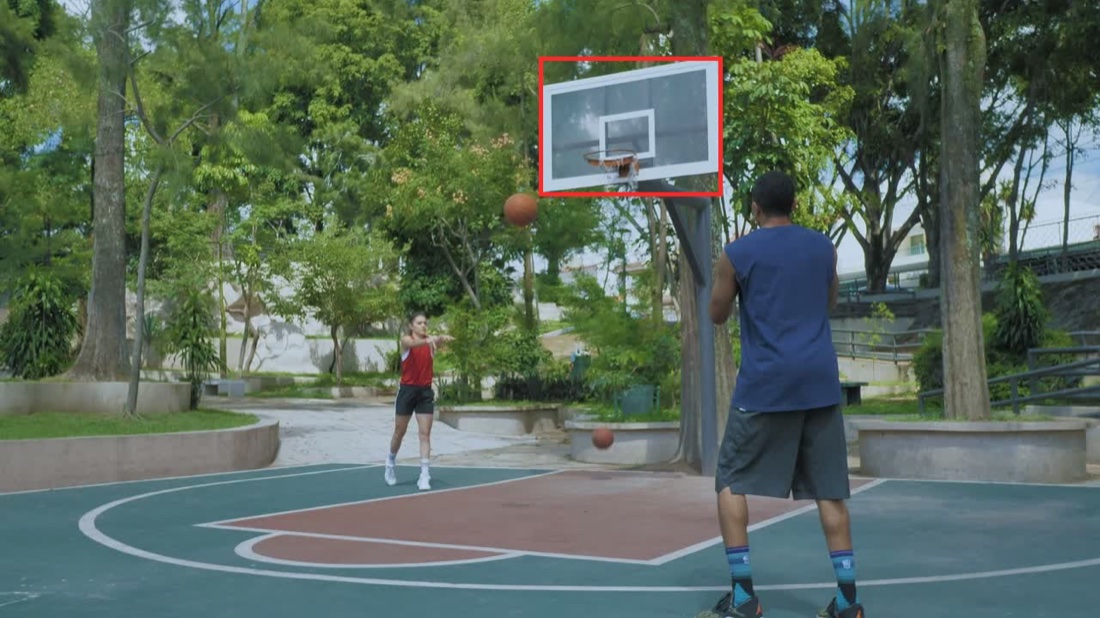
Locate the hoop with a Chinese prompt
框出篮筐In this run, the model located the backboard and hoop. It can still make mistakes when a target is distant, obscured, or absent.
How to review the output
Compare 0.0–1.5 seconds with 1.5–3.0 seconds. The original bicycle field changes from true to false. Select each window to review the image sequence behind that change.
The 20/20+ value is the category returned in the person-count field. When organizing footage, fields like this can help group clips for review. Check the original footage for an exact count or an ambiguous case.
The hoop box shows localization on a single frame. In a footage-review workflow, the next step would be to confirm the target and the box before keeping that frame as a reference.
Where these examples come from
This preview uses saved outputs from a local LLaVA-OneVision-2.5-4B prototype. Apply for the Studio beta to tell us what you want to analyze.
The prototype analyzes visuals only. Review the structured output before relying on it.
Automatic highlights · Coming soon
Apply for the video betaUpcoming video tools
Image to Video
Turn a reference image into a short video using a description of the scene and camera movement. This tool is coming soon.
View previewAI Video Upscaler
Video super-resolution is coming soon. The planned tool will take an existing clip or an approved Studio preview and prepare it at a higher output resolution.
View previewVideo Frame Interpolation
Frame interpolation is coming soon. It will generate intermediate frames to increase the output frame rate of an existing clip.
View previewAI Video Highlights
Sign in to find moments with people, vehicles or buses in a short video, review the suggested clips and export your selection.
View preview